Pressed to Act: How Fake Urgency in App Alerts Is Being Used to Pick Your Digital Pockets
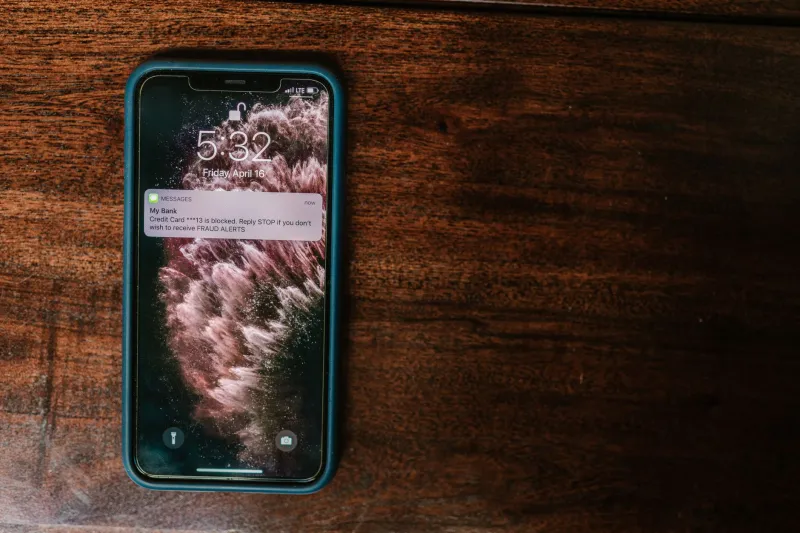
There is a moment most smartphone users know well: a notification appears, its language clipped and alarming — Your account has been compromised. Tap to secure it now. The instinct that follows is nearly automatic. Tap first, think later. That reflex, cultivated by years of legitimate app design, has become one of the most exploited vulnerabilities in modern cybersecurity.
Attackers are no longer relying solely on email phishing campaigns or fraudulent websites. They have moved to the notification layer — a space users have been trained to trust and respond to quickly. The results are a growing category of social engineering attacks that researchers are calling "push phishing" or "notification spoofing," and they are targeting Americans across every major mobile platform.
The Architecture of Alarm
To understand why these attacks work, it helps to understand what legitimate app designers already know about human psychology. Notifications are engineered to interrupt. They arrive with sound, vibration, and visual cues specifically calibrated to demand attention. The field of behavioral economics describes this as "attentional capture" — the brain's automatic redirection of focus toward perceived threats or time-sensitive stimuli.
Cybercriminals exploit this architecture with precision. A fraudulent alert mimicking a banking app might warn of an "unauthorized login attempt" and instruct the recipient to verify their identity "within 15 minutes to prevent account suspension." Every element — the countdown, the implied consequence, the instruction to act — is designed to suppress the analytical thinking that would otherwise identify the scam.
Dr. Robert Cialdini's foundational research on influence identified scarcity and urgency as two of the most powerful levers of persuasion. Notification-based attacks weaponize both simultaneously, compressing the window in which a user might pause and question what they are seeing.
Real Attacks, Real Consequences
The threat is not theoretical. In 2023, the Federal Trade Commission documented a surge in mobile-based social engineering complaints, with losses attributed to fraudulent alerts exceeding hundreds of millions of dollars. Several documented attack patterns have emerged.
Carrier impersonation alerts notify users of a supposed billing problem or account suspension, directing them to a cloned carrier website where credentials are harvested. Because Americans are accustomed to receiving genuine service alerts from providers like Verizon, AT&T, and T-Mobile, the psychological friction of skepticism is low.
Two-factor authentication (2FA) prompt bombing, sometimes called MFA fatigue, floods a target with repeated authentication push requests. The goal is not to trick the user into approving a single request through deception — it is to exhaust them into approving one simply to make the notifications stop. This technique was central to the 2022 Uber breach, in which an attacker gained internal network access after an employee eventually approved a persistent push notification.
Malicious app notifications represent a subtler variant. Applications downloaded from unofficial sources — or, in documented cases, from legitimate app stores before removal — generate alerts that redirect users to credential-harvesting pages. The notification appears to originate from the device itself, lending it an unearned air of authority.
Why Your Brain Loses This Fight
The cognitive science here is worth examining. Security researchers at Carnegie Mellon's CyLab have studied what they term the "security-usability tradeoff" — the consistent finding that when users are under time pressure or emotional stress, security-conscious behavior degrades sharply. Notifications that convey threat and urgency are, by design, both stressful and time-pressured.
There is also the matter of context collapse. When you receive a push alert, you are rarely in a dedicated, focused state. You are commuting, cooking, or half-watching television. The cognitive bandwidth available for critical evaluation is limited. Sophisticated attackers understand this and time their campaigns accordingly — late evenings and weekend mornings, when vigilance is typically lower, show elevated attack rates in multiple industry reports.
Recognizing the Manipulation
Identifying a fraudulent notification is not always straightforward, but several reliable indicators exist.
Inspect the sender before acting. Legitimate apps do not typically ask you to confirm sensitive information through a notification tap alone. If an alert claims to be from your bank or carrier, close the notification and navigate to the app directly by opening it from your home screen — never through the alert itself.
Treat countdown language as a red flag. Time limits embedded in notifications — "Act within 10 minutes," "Your window is closing" — are a manipulation signature. No legitimate financial institution will permanently close your account because you took twenty minutes to respond.
Verify through a second channel. If a notification claims there is a problem with your account, call the institution's official customer service number or log in through a browser using a manually typed address. Never use contact information provided within the notification itself.
Audit your installed applications. Periodically review the apps on your device and revoke notification permissions from any application that does not have a clear, ongoing need to reach you. Fewer notification sources mean a smaller attack surface.
Platform-Level Protections
Both Apple and Google have implemented controls that can limit exposure. iOS users can navigate to Settings > Notifications and disable alerts on a per-app basis, while Android offers similar granular controls through its notification management panel. Enabling "Focus" modes during off-hours on either platform can suppress non-essential alerts entirely.
For users who have received suspicious push notifications from apps, reporting them directly to the app store — Apple's App Store or Google Play — and to the FTC at ReportFraud.ftc.gov creates a paper trail that can accelerate enforcement action.
The Broader Lesson
The notification tray has become a contested space — one where legitimate businesses compete for your attention alongside actors who want to steal from you. The design language is often identical. The only meaningful difference is intent, and intent is not visible at a glance.
Building the habit of a one-second pause before tapping any alert that conveys urgency or requests action is not paranoia. It is the minimum viable defense against an attack category that is growing in both sophistication and volume. In the arms race between attacker ingenuity and user awareness, that pause may be the most valuable second you spend all day.