Always Listening: The Hidden Permission Creep That Turns Your Phone Into a Surveillance Device
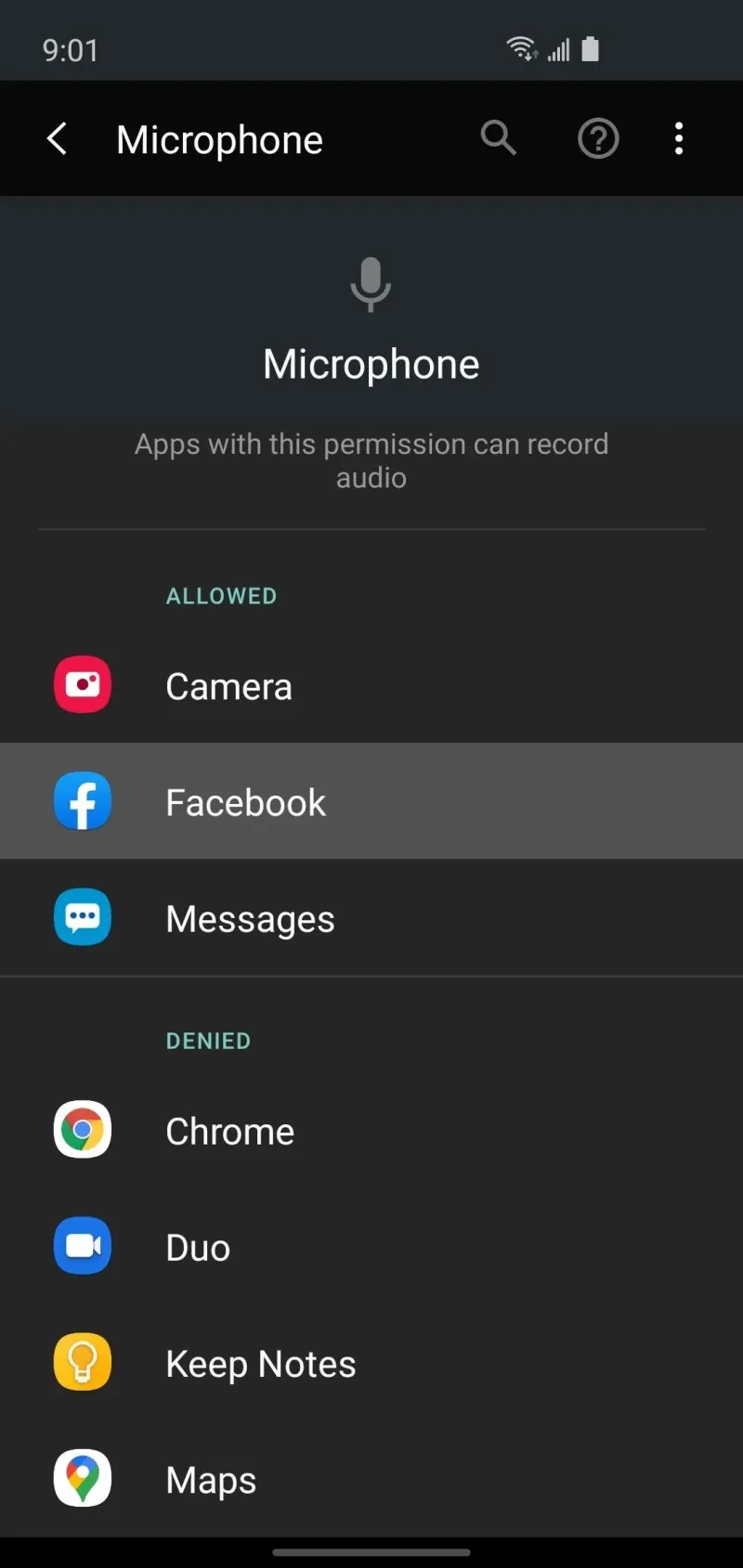
Photo: smartphone microphone camera permissions privacy settings, via assets.content.technologyadvice.com
When you download a flashlight app and it asks for microphone access, the request might seem odd — but most people tap "Allow" and move on. That single gesture, repeated across dozens of apps on a typical American smartphone, quietly constructs a surveillance architecture that few users ever examine. Permission creep — the gradual accumulation of hardware access that far exceeds any legitimate function — has become one of the most pervasive and least visible privacy threats in everyday digital life.
The mechanisms behind it are not exotic. They are built into the ordinary permission systems that Apple and Google designed to protect users. The problem is that those systems rely heavily on trust, and a significant portion of the app economy has learned to exploit that trust with remarkable efficiency.
What Permissions Actually Mean — and What They Don't
Both iOS and Android operate on a consent-based model for sensitive hardware access. When an app wants to use your microphone, camera, location, or contacts, it must request permission, and the operating system presents a dialog box asking you to decide. In principle, this creates a meaningful checkpoint. In practice, it creates the illusion of one.
The core problem is that permissions are broad by design. Granting microphone access to a social media app does not simply allow it to record voice memos. It may authorize background audio sampling during ordinary use sessions, access during periods when you believe the app is closed, and — depending on how the operating system manages background processes — intermittent activation that generates no visible notification.
Researchers at Northeastern University conducted a widely cited study examining whether popular Android apps were covertly activating device microphones. While they did not confirm continuous secret recording, they did document apps capturing and transmitting screenshots and screen recordings without explicit user awareness. The data was being sent to third-party analytics firms — a practice that was technically permitted under the permissions users had granted, but almost certainly not what those users believed they were consenting to.
The Technical Loopholes Developers Exploit
Several mechanisms allow apps to access hardware well beyond what a reasonable user would expect.
Bundled SDKs and third-party libraries. When a developer builds an app, they typically incorporate third-party software development kits — packages of pre-written code that handle advertising, analytics, crash reporting, and social login. Each of those SDKs may independently request and use permissions that the developer themselves never specifically programmed. An app that legitimately needs microphone access for voice search may bundle an advertising SDK that uses the same permission to conduct acoustic environment detection — identifying ambient sounds to infer your location, mood, or activity for targeting purposes.
Vague permission justifications. Both Apple and Google require developers to provide a usage description when requesting sensitive permissions. However, these descriptions are self-reported and rarely verified with meaningful rigor before an app reaches the store. A music app can truthfully state that it requests microphone access "to record audio" — a justification that technically covers both its stated karaoke feature and any secondary data collection the SDK performs in the background.
The "always on" loophole. On Android in particular, apps that are granted certain permissions can retain them even when running in the background. Unless a user specifically revokes access or the operating system enforces stricter background restrictions, an app granted microphone access during a single interactive session may retain that access indefinitely.
Real-World Examples Worth Knowing
The examples are not hypothetical. In 2019, Facebook faced significant scrutiny after users reported that the platform appeared to surface advertisements eerily relevant to private conversations they had held near their phones. Facebook denied using the microphone for ad targeting, and no definitive proof of secret recording was produced. But the episode illustrated how thoroughly the public's trust in permission boundaries had eroded — and how difficult it is to audit what is actually happening at the hardware level.
Separately, a 2020 investigation by Privacy International documented dozens of popular Android apps sharing detailed behavioral data with advertising networks in ways that far exceeded what their permission requests implied. Several of those apps had tens of millions of downloads from American users.
Camera permissions carry analogous risks. Apps granted camera access for QR scanning or profile photo uploads can, under certain conditions, capture images or video in ways users do not anticipate. Security researchers have demonstrated proof-of-concept exploits in which malicious apps used camera permissions to photograph a user's surroundings silently, transmitting images to remote servers.
How to Audit and Restrict Permissions Right Now
The good news is that both major mobile platforms provide tools to review and revoke permissions — most users simply never use them.
On iPhone (iOS 15 and later): Navigate to Settings → Privacy & Security. Each sensitive permission category — Microphone, Camera, Location, Contacts — lists every app that has been granted access. Review each list carefully. For any app where the access seems disproportionate to its function, tap the app and switch the toggle off. iOS also offers a "While Using the App" restriction for many permissions, which prevents background access even when access is technically granted.
The App Privacy Report, found under Settings → Privacy & Security, logs which apps have accessed your microphone, camera, and other sensors over the past seven days. Reviewing this report regularly is one of the most direct ways to detect anomalous behavior.
On Android (varies by manufacturer, Android 12 and later): Navigate to Settings → Privacy → Permission Manager. Like iOS, this interface lets you review which apps hold each type of permission. Android 12 introduced privacy indicators — a small green dot in the status bar that appears whenever the microphone or camera is actively in use. If you see that indicator while an app is running in the background, treat it as a red flag.
Android also introduced approximate location permissions and one-time permission grants in recent versions, both of which limit the scope of what apps can access without requiring repeated user consent.
General best practices:
- Apply the principle of least privilege: if an app's core function does not require microphone or camera access, deny it.
- Periodically delete apps you no longer use. Dormant apps with active permissions are a silent liability.
- Before downloading any app, review its privacy policy specifically for references to third-party SDKs and data-sharing arrangements.
- Be particularly cautious with free apps whose business model is not immediately obvious. In the app economy, if the product is free, the product is often the data.
The Regulatory Landscape Is Shifting — Slowly
The Federal Trade Commission has taken enforcement action against several companies for deceptive data collection practices, and the American Data Privacy and Protection Act has been under congressional discussion for several years. However, comprehensive federal privacy legislation governing app permissions has not yet passed, leaving consumers largely dependent on the protections that Apple and Google choose to implement.
California's Consumer Privacy Act and its successor, the CPRA, provide the strongest statutory protections currently available to American users, granting residents the right to know what data is collected and to opt out of certain forms of sharing. But enforcement is uneven, and most users are unaware of the rights they hold.
Permission creep will not be solved by any single policy or software update. It is, at its core, a trust problem — and the most durable protection available to ordinary users is informed skepticism. Treat every permission request as a question worth answering carefully, not a dialog box to be dismissed as quickly as possible.